


For shortlisted beta drive users only. Please keep the contents of this guide confidential and refrain from sharing it with others.
Welcome to GetGo’s Drive to Malaysia (DTM) Beta Guide! This guide covers everything you need for a smooth trip, from booking your car to crossing the border, and getting home safely.
Your reward: Complete your beta drive and fill in the Post-Drive Feedback Form to earn a $25 promo code for your next GetGo drive.
Got questions or run into any issues along the way? Reach us via Live Chat in the app for immediate support or drop us an email at hello@getgo.sg.
What is GetGo’s DTM feature?
DTM is a soon-to-be launched feature that lets GetGoers like yourself drive a GetGo car across the causeway into West Malaysia smoothly and easily — no mileage charges, no unfamiliar rental agents. Just book, drive across, explore, then head home.
Eligible crossings: Woodlands Causeway or Tuas Second Link
Coverage: West Malaysia only
Duration: Update the app to version 4.2.0 from 21 July 2026, 10am and make a booking anytime from 28 July 2026, 10am to 28 August 2026, 11.59pm.
1. Finding your eligible GetGo car
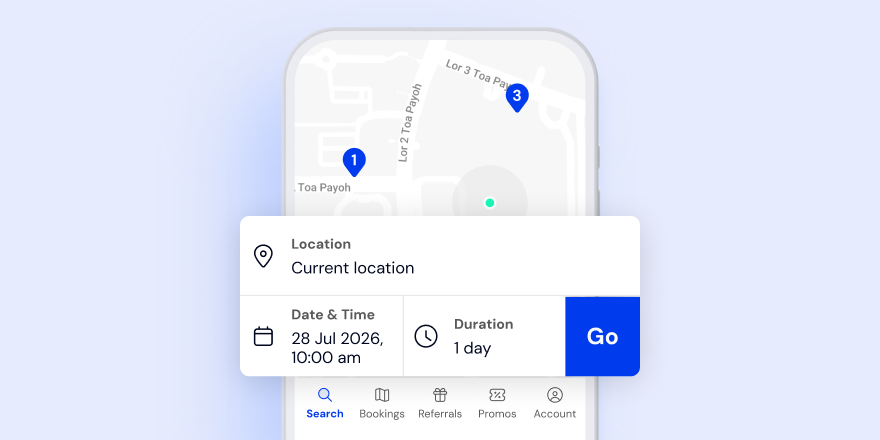
1. Open the newly updated version 4.2.0 of your GetGo app. Select your preferred date and time, then tap “Go” and you will be directed to the search results page.
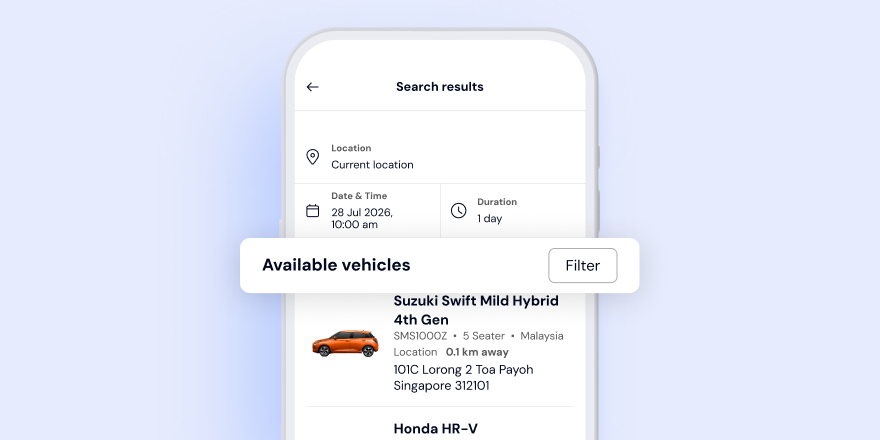
2. In the search results page, tap the “Filter” button to show all available vehicles in your area.
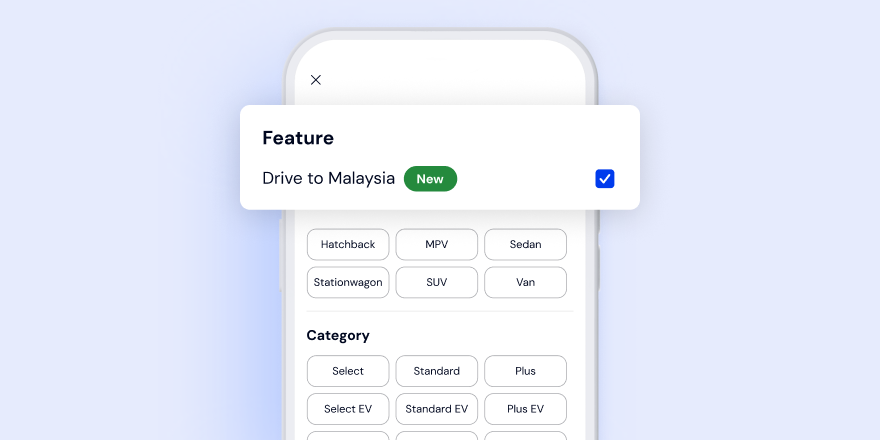
3. In the filter page, tick the “Drive to Malaysia (New)” check box to show the cars eligible for DTM near you.
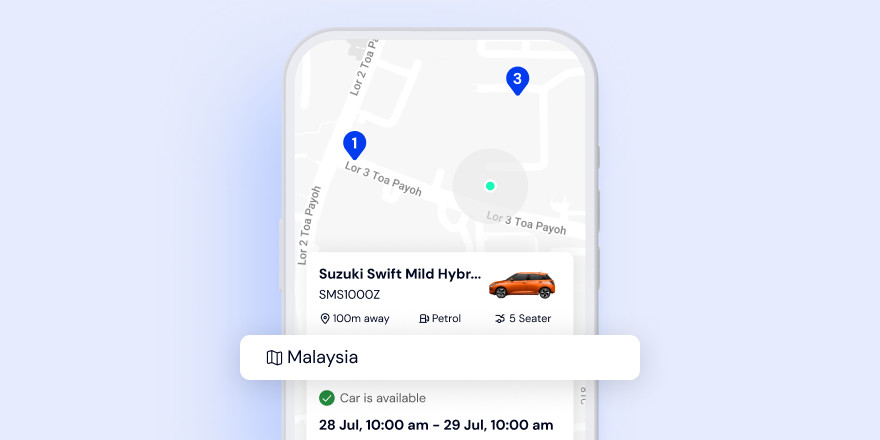
4. Look out for cars with the dedicated ‘Malaysia’ tag on the vehicle cards to make your booking.
2. How to book and opt in for DTM
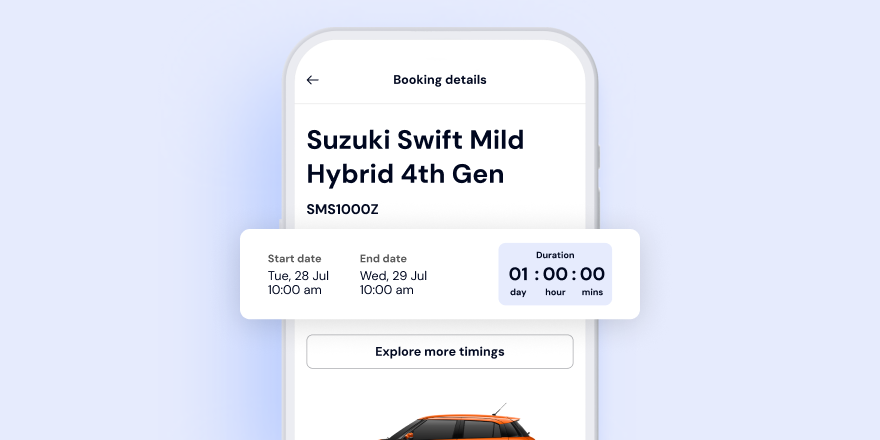
DTM bookings must be at least 24 hours (1 full day) to allow adequate travel time to Malaysia and back.
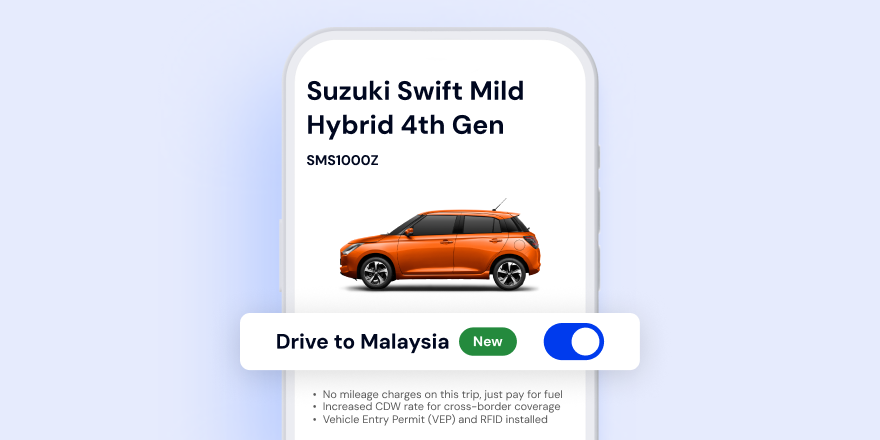
On the booking page, tap the toggle button to opt in for DTM before confirming your booking.
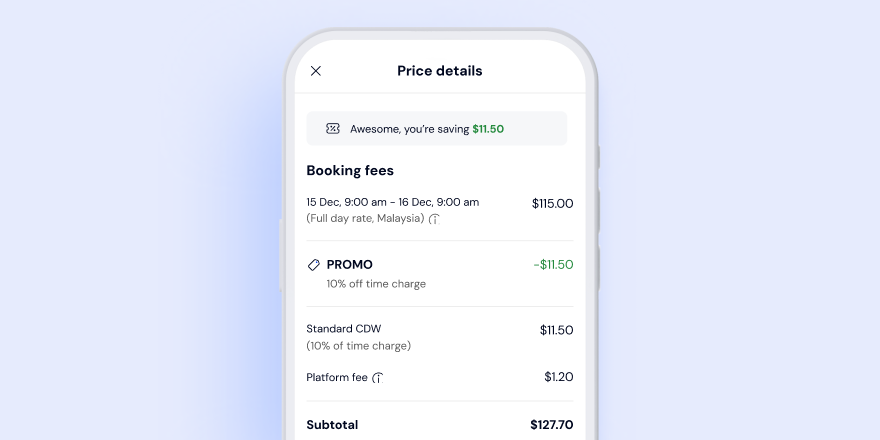
The applicable surcharge and updated prices will be reflected before you confirm your booking.
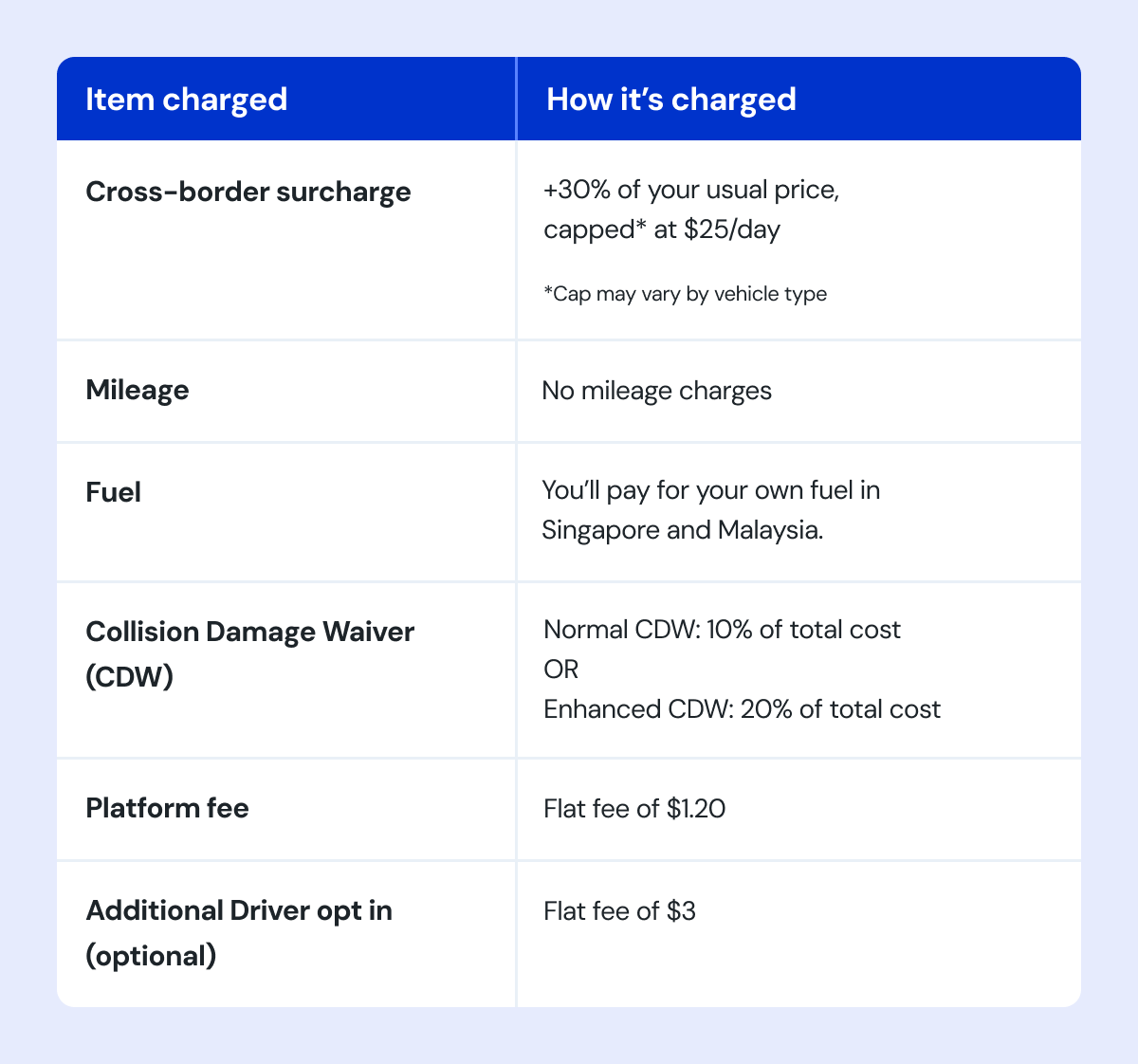
3. What you'll be paying for
4. Your pre-trip checklist
Documents to bring
- Physical passport of all travelers with at least 6 months’ validity
- Valid physical driving licence of all registered drivers
- Fully topped up physical Touch 'n Go (TnG) card for the RM20 cross border road charge, Malaysian tolls, and parking fees.
Mobile phone essentials
- GetGo app updated to the latest version (version 4.2.0)
- Data roaming for access to Live Chat support and accessing key app features such as locking/unlocking the car
- Powerbank and charging cable (optional but handy — you’ll need your phone sufficiently charged to lock and unlock the car)
Fuel — important!
- Ensure that your tank is at least three-quarter full before crossing the border. This is a Singapore Customs requirement and non-compliance will result in fines of up to $500.
- If needed, refuel at any Singapore petrol station before heading to the causeway.
- Take a dashboard photo when you start your booking. This is required for fuel verification upon return and will be used in the event of any disputes.
5. Crossing the border
- Your car already has a VEP RFID tag installed. Simply tap your TnG card at the toll gantry and the RM20 road charge will be deducted automatically.
- Have your passport(s) and driving licence(s) ready at immigration.
6. What to know in Malaysia
Fuel
- Use RON97 or above only. RON95 is not permitted for Singapore-registered cars in Malaysia.
- You’ll pay for your own fuel. There will be no reimbursement for fuel costs.
Tolls & parking
- Tolls: Use your physical TnG card
- Gantry parking (malls, carparks): TnG card or debit/credit card
- On-street parking: Download the relevant state parking app:
- Selangor: Smart Selangor
- Johor Bahru: MBJB Spot
- Each state has its own app, so make sure to do a quick check on which app applies in advance before you park.
Road rules
- Drive on the left
- Highway speed limit: 110 km/h | Urban areas: 50 to 80 km/h
- Keep left — the right lane is for overtaking only
- Seatbelts are mandatory for all passengers
What's not allowed
- Do not use your GetGo car for any ride-hailing or paid chauffeuring services whether in Singapore, across the causeway, or anywhere in Malaysia. Malaysian law prohibits this for Singapore-registered cars. Any violation will result in immediate account suspension.
- No unauthorised drivers. Only the GetGo account holder (Primary Driver) and any pre-added Additional Drivers are covered under insurance and can drive the GetGo car. If an unregistered driver is found behind the wheel, insurance cover will be void and you will be liable for additional penalties and charges.
- No driving into Thailand. Insurance coverage applies to West Malaysia only. Any violation will result in immediate account suspension and a vehicle recovery cost of up to several thousand dollars.
7. Getting help on the road
Always reach out to GetGo via Live Chat first — DTM users receive priority support and we're here 24/7 to guide you through every step.
Breakdown
Minor vehicle issues:
Contact GetGo via Live Chat. Our Malaysia partner will reach you within 45 minutes, wherever you are in Malaysia.
On a highway:
Use the bright orange emergency phones located every 2km along expressways, or call PLUSRonda at 1800-88-0000 (toll-free, 24/7). They'll tow you to the nearest Rest and Service Area (R&R — Rehat & Rawat) at no cost and all you need to do is to let GetGo know your R&R location and we'll arrange onward recovery.
Major vehicle issues:
The vehicle will be recovered back to Singapore. Follow the instructions from our GetGo Live Chat team.
Accident
- In the event of an emergency, contact GetGo immediately through our accident hotline +65 6564 3846 and follow the instructions given.
- Do not admit fault at the scene.
- Exchange details with all parties involved: full name, NRIC/passport number, driving licence, contact number, and vehicle plate.
- Photograph all vehicles involved and any damages incurred at the scene to preserve all evidence.
- Call 999 (Malaysian emergency services) if any injuries are sustained.
- File a police report at the nearest Balai Polis Trafik within 24 hours
- Important: the report must be filed in the state where the accident occurred. Reports filed in a different state will not be accepted.
8. Making your way back to Singapore
- Return to Singapore and end your booking with your tank at least half full. A $35 charge will be applied per quarter-block shortfall.
- Please return the vehicle in good condition:
- Clean and free of rubbish
- All accessories intact
- No prohibited or illegal items left in the car
- Take a dashboard photo of your fuel gauge for submission via the app at the end of your booking.
- Bookings cannot be ended in Malaysia. Make sure to return your car to its original home lot in Singapore before ending your booking.
- Allow at least 2 hours as a buffer for customs clearance. You’ll receive a push notification 3 hours before your booking ends as a reminder. Standard late fees apply if you’re unable to extend your booking in time.
Need more time? Extend your booking in-app as usual. The cross-border surcharge applies to any extended hours too.
9. Tell us how your trip went
We’d love to hear from you! Your feedback goes a long way in shaping the GetGo experience for our community when crossing the causeway.
- Fill in the Post-Drive Feedback Form (link sent via email/app)
- A $25 promo code* to offset your next GetGo drive will be credited to your promo code wallet once you complete the form by 28 August 2026. Allow 3 to 5 business days for the promo code to be issued.
- For any real-time issues during your trip, reach us via Live Chat in the app.
*Terms & Conditions:
1. Code is valid for one booking scheduled and completed by 28 February 2027.
2. Code can only be redeemed once per user.
3. Applicable discount is $25 off the total charge, with no minimum duration, excluding platform fee, Additional Driver fee and Collision Damage Waiver opt in charges.
4. Code is valid for all vehicle categories.
5. Code cannot be used in conjunction with other promotions, discounts, and other vouchers.
6. GetGo reserves the sole and absolute right to withdraw, amend and/or alter any part or the whole terms and conditions of the promotion without prior notice.
FAQs
How far can I drive in Malaysia?
Anywhere in West Malaysia — whether that’s somewhere nearby like Johor Bahru or as far as Kuala Lumpur, it’s yours to explore!
Can I add an Additional Driver (AD)?
Yes, you can. Include your AD’s details in the confirmation form and add them on the booking details page before confirming your booking.
Can I extend my booking while I’m in Malaysia?
Yes, extend in-app as usual. The cross-border surcharge applies to the extended hours.
What if I get a speeding fine or traffic summons?
Contact GetGo and we will follow up with further instructions. Do note that unpaid fines may prevent re-entry into Malaysia for future trips.
The car went offline in Malaysia — what do I do?
If you're in a dead zone, the app should still allow you to lock/unlock the car. If you’re unable to access the car, contact GetGo via Live Chat immediately.
Can I use my TnG app instead of a physical TnG card at the causeway?
We recommend using a physical TnG card. The TnG app will not work at the toll gantry as the car’s VEP RFID tag is tied to GetGo and the app needs to be linked to the vehicle’s VEP RFID to function. Better to have the physical card on hand to avoid any holdups at the gantry!
Can I refuel using a physical TnG card in Malaysia?
You can pay for fuel however you like in Malaysia. Just remember to use RON97 or above only.
What if I'm stopped at a roadblock?
Show your passport and driving licence. The car's VEP and insurance documentation are tied to the vehicle. If you need any documentation support, contact GetGo via Live Chat.
Can I go off-roading in Malaysia with my GetGo car?
Off-roading is not permitted in any GetGo vehicle. Driving on unpaved or uneven terrain can cause serious damage to the car’s undercarriage, and any damage resulting from off-road driving will not be covered under your insurance. Keep to paved roads and you’re all set for a smooth drive!
Drive safe and enjoy Malaysia!
— Your GetGo Team


